


Learn how to switch to Google Analytics 4. Build your measurement strategy now and in the feature.

Updated October 2026: Universal Analytics stopped collecting data on 1 July 2023, so Google Analytics 4 is now the only version. We've updated this post with the current steps for adding GA4 to a Wix site.
Google Analytics 4 (GA4) is now here! Google announced that GA4 would replace Google Universal Analytics (UA).
As the change will come into force from July 2023, UA will stop processing new hits. This may be less-than-great news if you fear change, but the new functionality is intended to provide superior analytics in a third-party-cookieless world.
To commemorate the release of GA4, this article provides an overview of the significant changes the platform has made compared to UA. We'll also discuss what it takes to prepare your account for the difference and how to make the switch.
Please, note that this article is for website owners using Universal Analytics and looking to switch to a GA4 property.
Switching to Google Analytics 4 - Blog content
1. What is happening with Universal Analytics?
Universal Analytics has been the industry standard for measuring performance and engagement of keyword strategies for nearly ten years.
As the platform was published during the times when people used to interact with websites using desktop computers mainly, it does not provide a unified experience for properties across multiple channels.
"People expect to interact with businesses when and how they like, such as browsing a brand's website to research a product and then purchasing it later using the brand's app.
Getting insight into these cross-platform journeys is critical for businesses to predict customer needs and provide great experiences—but it can be very challenging."
Russell Ketchum
Director of Product Management for Google Analytics
2. An Introduction to Google Analytics 4
For a long time, UA was designed to help you monitor data on desktop websites, with mobile traffic often being an afterthought. Google Analytics 4 changes this approach by allowing you to merge various formats into singular user journeys.
With Google Analytics 4, you can view measurements of your web and mobile apps and gain insights through machine learning algorithms to optimally design these resources.
Google Analytics 4 does not use cookies exclusively. It offers a heightened awareness of user privacy. In recent years, privacy concerns have caused cookies to become an even bigger issue than in the past.
This has motivated many companies to search for alternative data collection options. With GA4, it has become easier to modify the metrics, so measurements no longer depend on sessions. The new platform can recognize and quantify different interaction types like:
Page views
Scrolls
Outbound clicks
In-site searches
Video engagement metrics
File downloads
With the current version of Google Analytics, you are required to set up complex functions to obtain all relevant metrics. The new platform can automatically tag the occasions for you, thereby making it easy for you to gain access to extra data more immediately.
When you switch to Google Analytics 4, you will get better funnel reports and insights into how customers react to the pages in the funnel. Thanks to the in-depth cross-platform examination, you can discover users enter and drop out at which point.
3. Switching to Google Analytics 4 - timeline
If you use Google Analytics and haven't yet switched to Analytics 4, you'll need to know what the software offers and how it verges upon Universal Analytics.
Fortunately, you will have plenty of time to get acquainted with the service and trade with it before this function stops working.
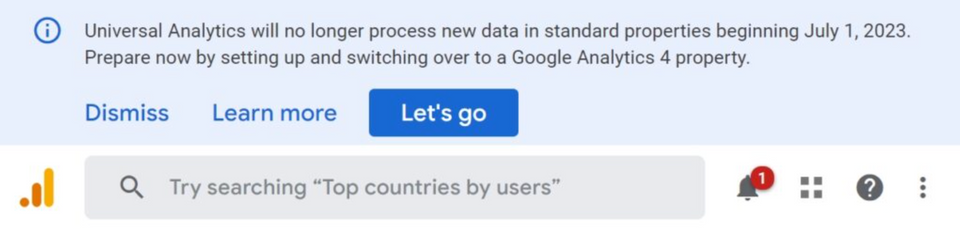
UA will stop collecting data beginning 1st July 2023. After 1st July 2023, you'll be able to access your previously processed data in your Universal Analytics property for at least six months. [1]
After 1st July 2023, you'll be able to access your previously processed data in your Universal Analytics property for at least six months. [1]
Google Analytics 360 properties will receive a one-time processing extension ending on 1st October 2023. [1]
4. How to Move from Universal Analytics and switch to Google Analytics 4
A switch to Google Analytics 4 can appear to be different from the beginning, but it happens to be easy to set up and configure the platform. Google sets an efficient onboarding process to help you through the process.
Step 1: Create a Google Analytics 4 Property
Top Tip
To begin with, please ensure that you're not already using Google Analytics 4. If you set up a property after 14th October 2020, it s likely already using Google Analytics 4. To verify this, access your Google Analytics account and look at your list of properties. Properties that employ Universal Analytics will bear a UA prefix in their analytics IDs. Properties utilizing Google Analytics 4 will have G4A designations.

Sign in to your Google Analytics account.
Click the Admin icon at the bottom left of the page.
Click + Create Property.
Enter a property name, then choose your reporting time zone and currency.
Click Next, then select your industry category and business size.
Choose how you intend to use Google Analytics, then click Create.
Choose Web under Choose a platform.
Add your website URL and a stream name under Set up your web stream.
Click the Settings icon.
Click Show advanced settings under Page views.
Deselect the Page changes based on the browser history events checkbox.
Disable the Site search toggle.
Click Save.
Click Create stream.
REF 1

Step 2: Add your Google Analytics 4 to your Wix site
To add your GA4 property:
Copy your measurement ID under Web stream details.
Go to Marketing Integrations on your site's dashboard.
Click Connect under Google Tag.
Click Add Google Tag ID.
Paste your Google Analytics 4 measurement ID in the pop-up.
Note: Make sure that there are no extra spaces before the code.
(Optional) Select the IP Anonymization checkbox if you want to hide your site visitors' IP addresses from Google.
Click Save.
How to switch to Google Analytics 4 - The Key Takeaways
Google is pressing us to switch to Google Analytics 4. As of 1st July 2023, Google UA will no longer collect data.
That means that you need to seriously address your analytics plan as soon as possible to ensure that as of that date that your new GA4 property is tracking correctly and can provide you with accurate year-over-year data.
The new Google Analytics 4 automatically generates tracking for several events you set up when you allow it to track your online site. However, it excels when you configure custom events and departments to keep track of specific data.
Are you ready to start working with Google Analytics 4? Go ahead and start building the necessary historical data in the new property to prepare for the continuity once Universal Analytics are no longer available.
Do you still have questions on how to switch to Google Analytics 4? Do you need help?
We know changes are stressful. Hang in there. It's going to be OK. If you are not sure that you are capable of switching to Google Analytics 4, we can do it for you!
Schedule a free consultation with our Google Analytics Experts here at Vision Marketing to start using GA4 sooner rather than later. Switching to Google Analytics 4 now will help you act faster and have the capacity to assist more customers.
Trusted Source:
[1] Google


